Surprising use of koka effects for frontends
In the past few days I experimented with the wonderful koka programming language. I found out about the vast amount of compile time targets, one of them being javascript. Naturally my first instinct was to implement the elm architecture (TEA).
This ended up being a fun exercise and an exploration. The elm “counter” example, implemented in koka with a virtual dom and TEA runtime, looks like this
import vdom
import html
import events

pub fun main() : io ()
  run-app(init(), update, view, "#app")

type msg
  Increase
  Decrease

alias model = int

fun init()
  0

fun update( msg : msg, model : model ) : model
  match msg
    Increase -> model + 1
    Decrease -> model - 1

fun view( model : model ) : node<msg>
  div([], [
    button([Decrease.on-click], ["-".node]),
    model.show.node,
    button([Increase.on-click], ["+".node])
  ])
Take a look at github.com/janekx21/koka-vdom for more examples.
You have your standard init, view, update functions along with your model and msg datatypes. If you dipped your toe just a little into the elm world, this should look very familiar.
One koka feature that I wanted to try was the effect system, and more specifically the “val” effects. They can be written like this:
effect theme-color
  val background-color : string
  val foreground-color : string
  val primary-color : string
This defines a new effect called theme-color with three values, in this case colors for a theme. Using these in your components is easy. Just reference them:
fun line-input(attr)
  Elem("input", [
    Style("background-color", background-color),
    Style("border", "2px solid " ++ primary-color),
    Style("border-radius", "16px"),
    Style("color", foreground-color),
    Style("padding", "4px 8px")
  ] ++ attr, [])
This function now has an effect type of theme-color. This fact is inferred from the referenced values. If you would now try to call that function, it would not work. You would get a type error “effects do not match”:
type error: effects do not match
  inferred effect: <theme-color|_e>
  expected effect: total
Your code needs to handle the theme-color effect using a handler or “with” block.
with
  val background-color = "white"
  val foreground-color = "black"
  val primary-color = "oklch(45% 0.24 277.023)"
After registering this handler, all functions that get called afterwards use the theme colors you put into scope. After getting this to work, I extended the idea to also have a theme type like this:
type theme
  Light
  Dark
  Retro
Using this type, I can handle this effect with a helper function:
fun theme/handle-color(theme, action)
  with
   val background-color = match theme
     Light -> "white"
     Dark -> "black"
     Retro -> "oklch(88.272% 0.049 91.774)"
   val foreground-color = match theme
     Light -> "black"
     Dark -> "white"
     Retro -> "oklch(41% 0.112 45.904)"
   val primary-color =  match theme
     Light -> "oklch(45% 0.24 277.023)"
     Dark -> "oklch(58% 0.233 277.117)"
     Retro -> "oklch(80% 0.114 19.571)"

  action()
The action has type () -> <theme-color|e> a, but theme/handle-color returns a e a. This means that this function handles the effect of the function using the theme argument. This reduces to a nice with clause:
with theme.handle-colorThis next example uses this to style the whole application and the buttons individually.
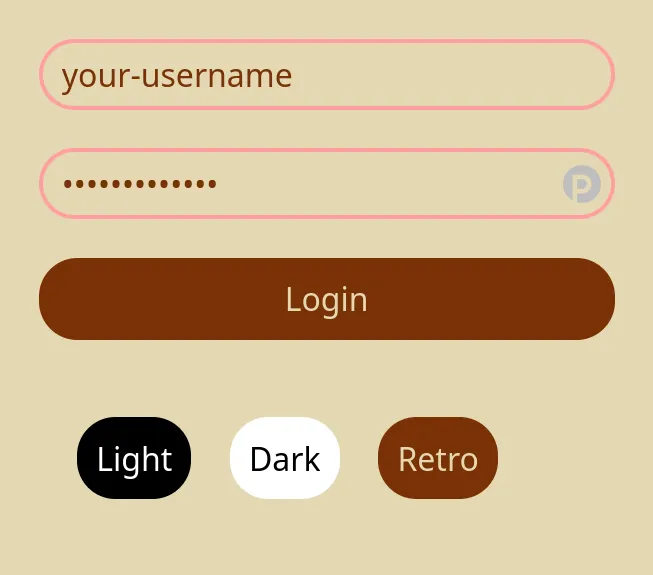
Of course this could also be done with just pure functions. But in that case the theme-color effect would be another parameter that would introduce prop drilling and boilerplate.
fun main() : ...
fun a(..., theme-color) : ...
fun b(..., theme-color) : ...
fun c(..., theme-color) : ...
fun d(..., theme-color) : ...
fun e(..., theme-color) : ...
fun f(..., theme-color) : ...
fun line-input(..., theme-color) : ...
Or it would end up like elm-ui-with-context, bringing a context into the node type.